
Auto top-up
I designed and launched auto top-up from scratch — a modular debit account feature that enables seamless payments by covering low-balance scenarios and maintaining a target balance, reducing payment failures
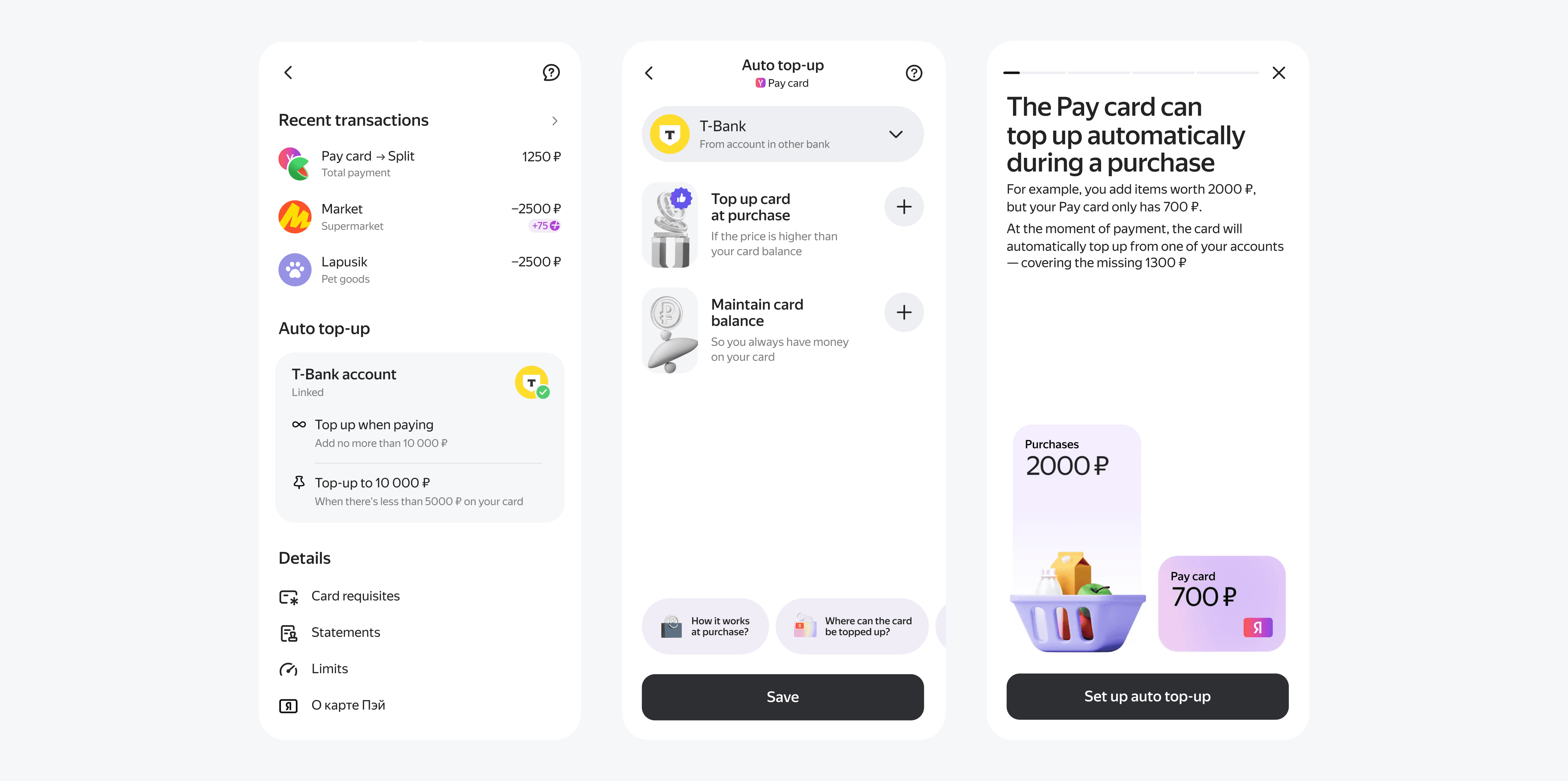
Pain point
Pay Card isn’t the primary account for most users but is valued for cashback. We needed to increase GMV and reduce low-balance payment failures
We tested two approaches: instant top-up during checkout and auto top-up to maintain a minimum balance
Step 1 — launching MVP
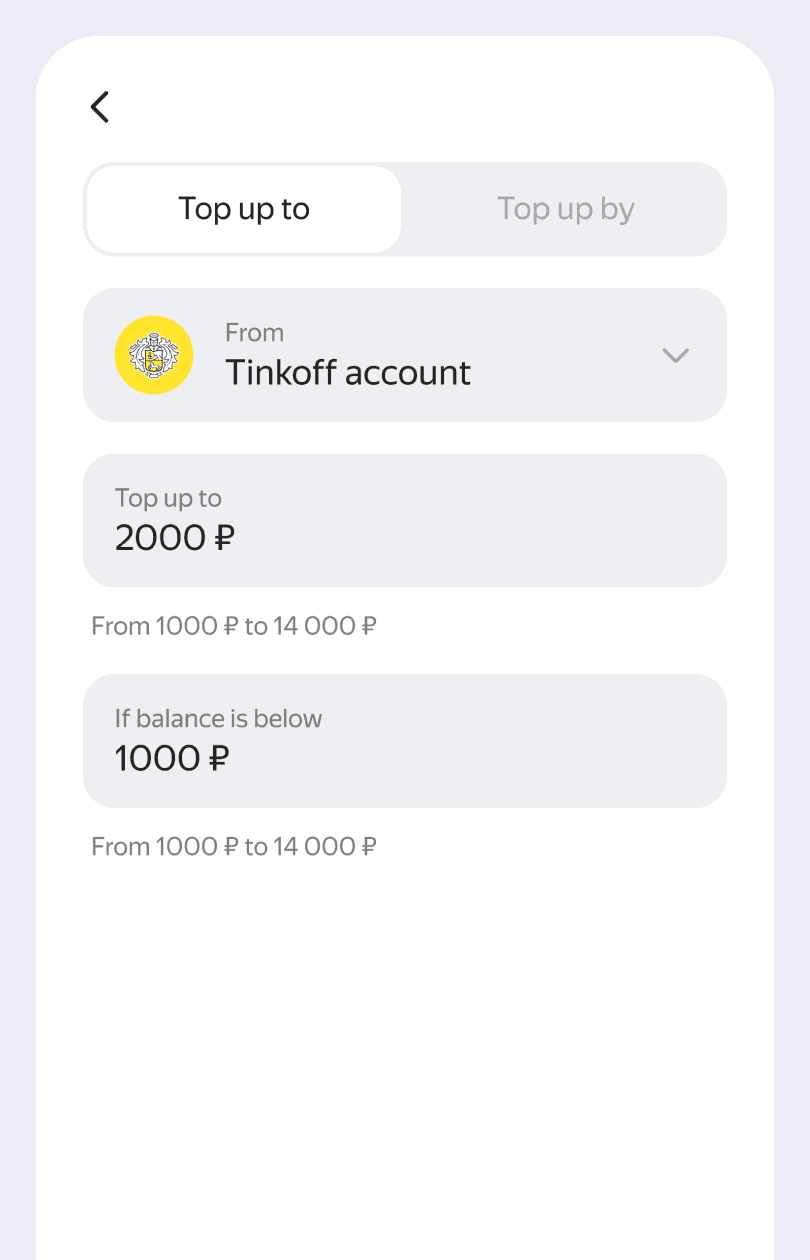
In the MVP, auto top-up was located in general settings, as the debit card had no dedicated section. The MVP covered core flows to validate the feature and measure results.
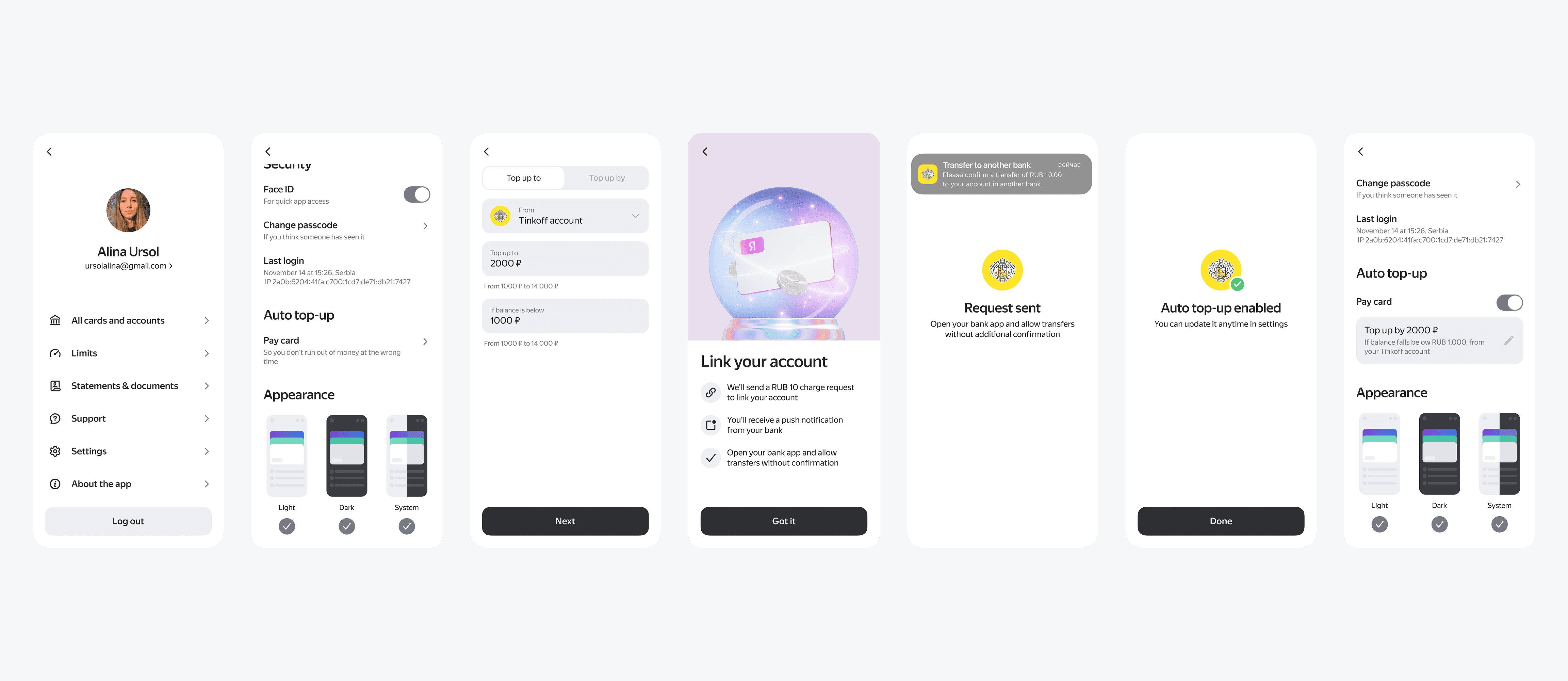
MVP revealed III issues
Issue I. Entry point
The entry point was hard to find
Solution
Solution
Once the Pay card got its own section, we moved auto top-up settings there. I solved by moving auto top-up settings into debit account
Step 2 —
next iteration
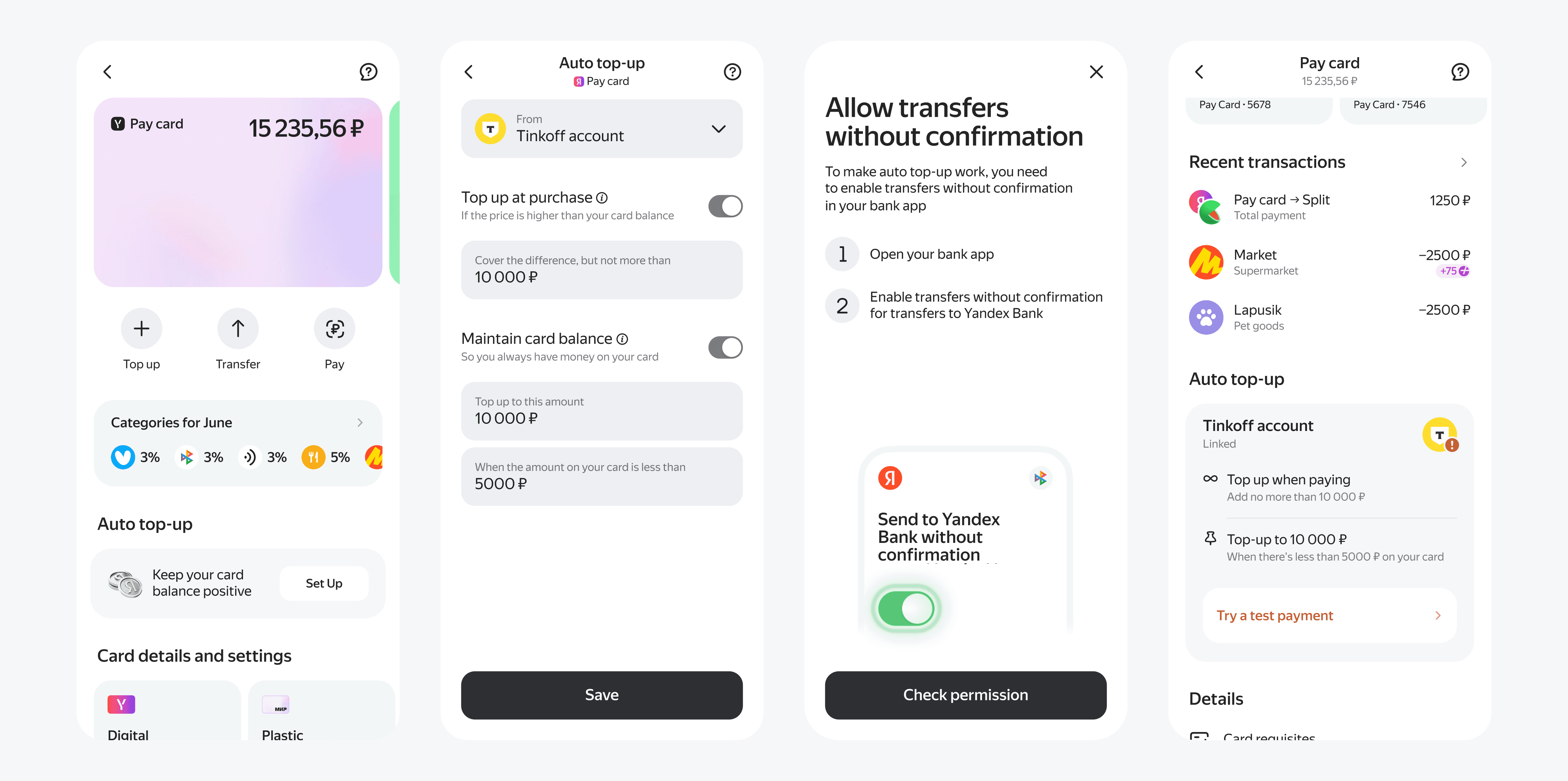
In this version, users easily found the entry point and understood the feature, but the linking payment remained a weak point, which we improved in the next iteration
Step 3 —
current version
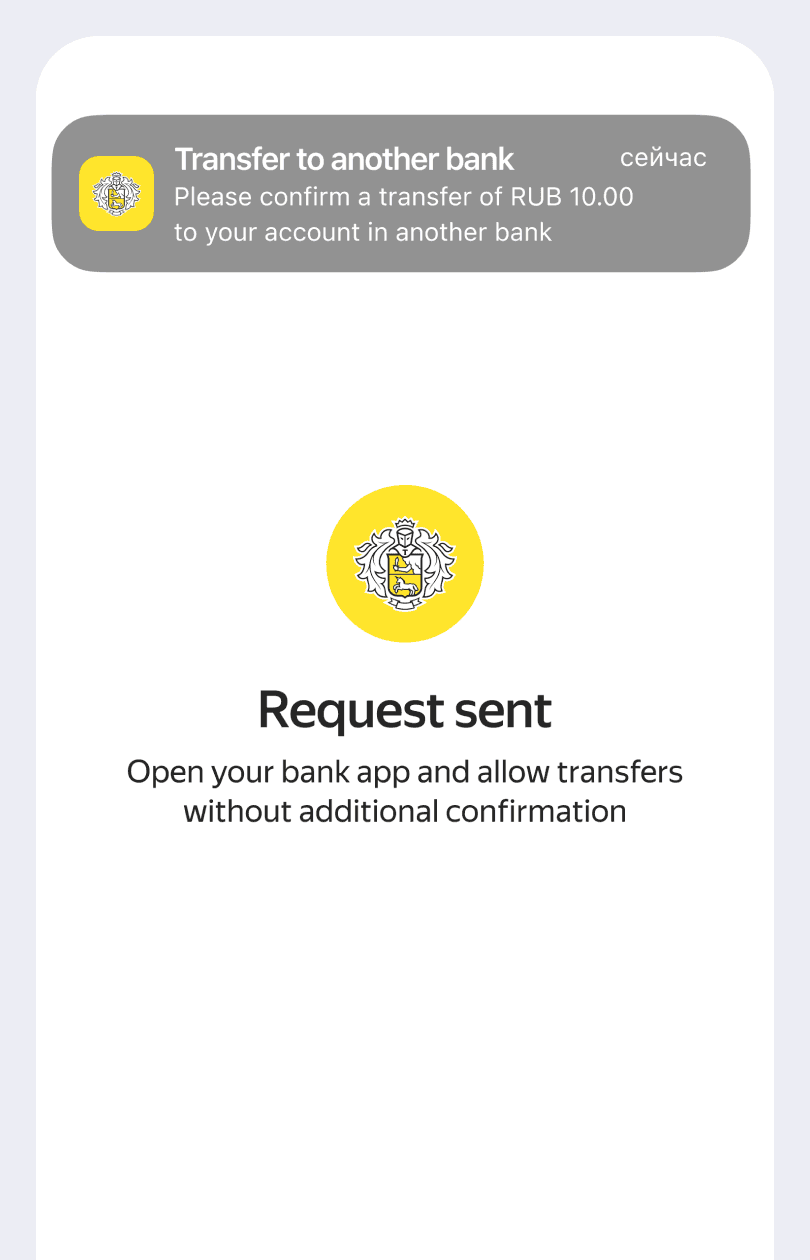
After the first version, conversion on the linking auto top-up was low. Users had to approve the transfer in their bank app, but many couldn’t find it. In the next iteration, we made the linking payment optional, as many users had already granted permission via previous transfers. Instead of removing it, we added a recommendation screen with a quick link to check it, and introduced an optional test payment to verify setup
Issue II. Errors
To address this, I introduced a widget-based setting that lets users see the current configuration and its status, helping them understand and resolve issues
Solution
Solution
To address this, I introduced a widget-based setting that lets users see the current configuration and its status, helping them understand and resolve issues
Issue III. Сommunication
Users didn’t understand how auto top-up works and hesitated to enable it
Solution
Solution
I Improved guidance and added in-product communication to clarify the process





MVP revealed III issues
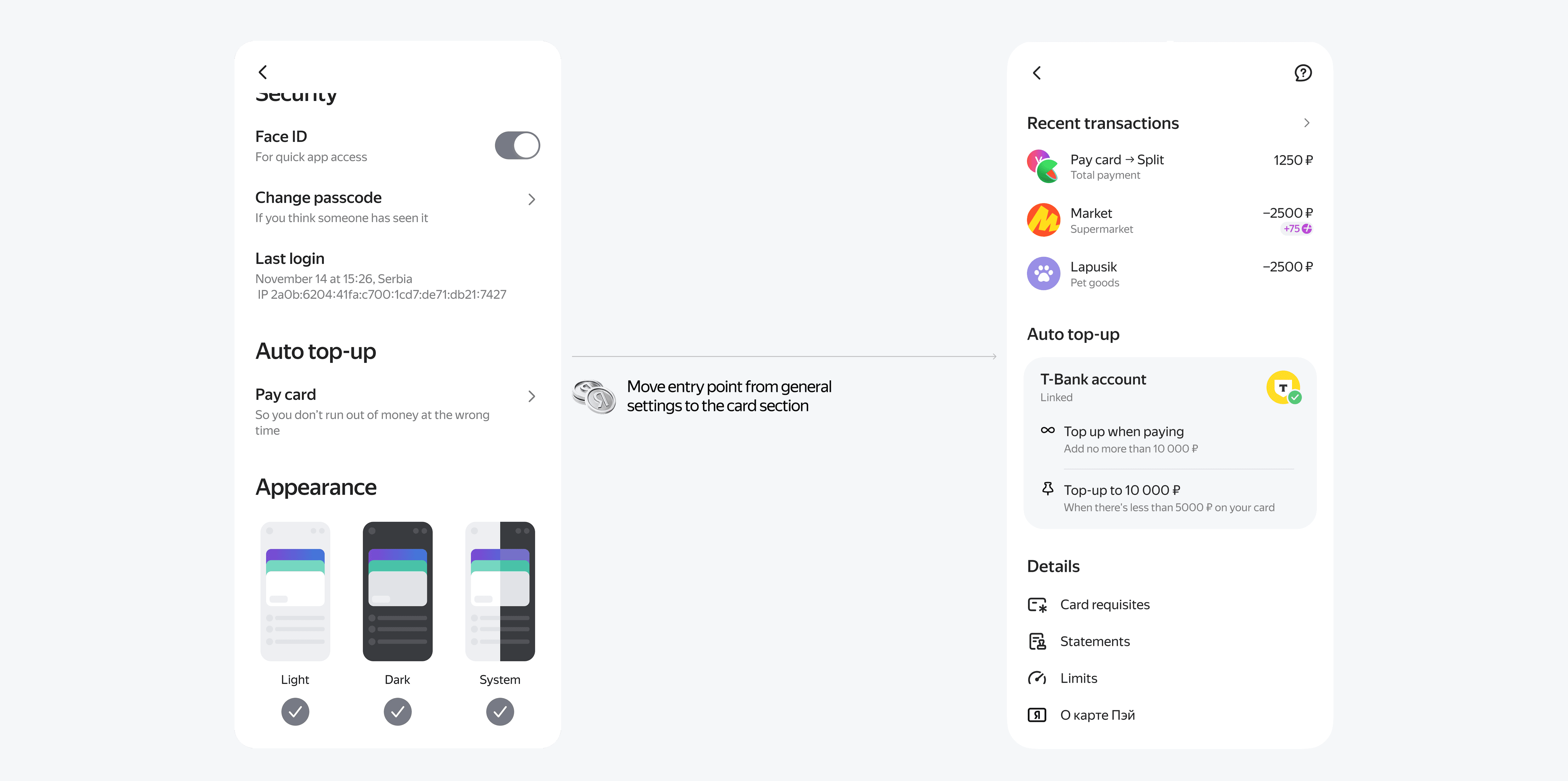
Issue I. Entry point
The entry point was hard to find in general settings.
Solution
Once the Pay card got its own section, we moved auto top-up settings there. I solved by moving auto top-up settings into debit account

Issue II. Errors
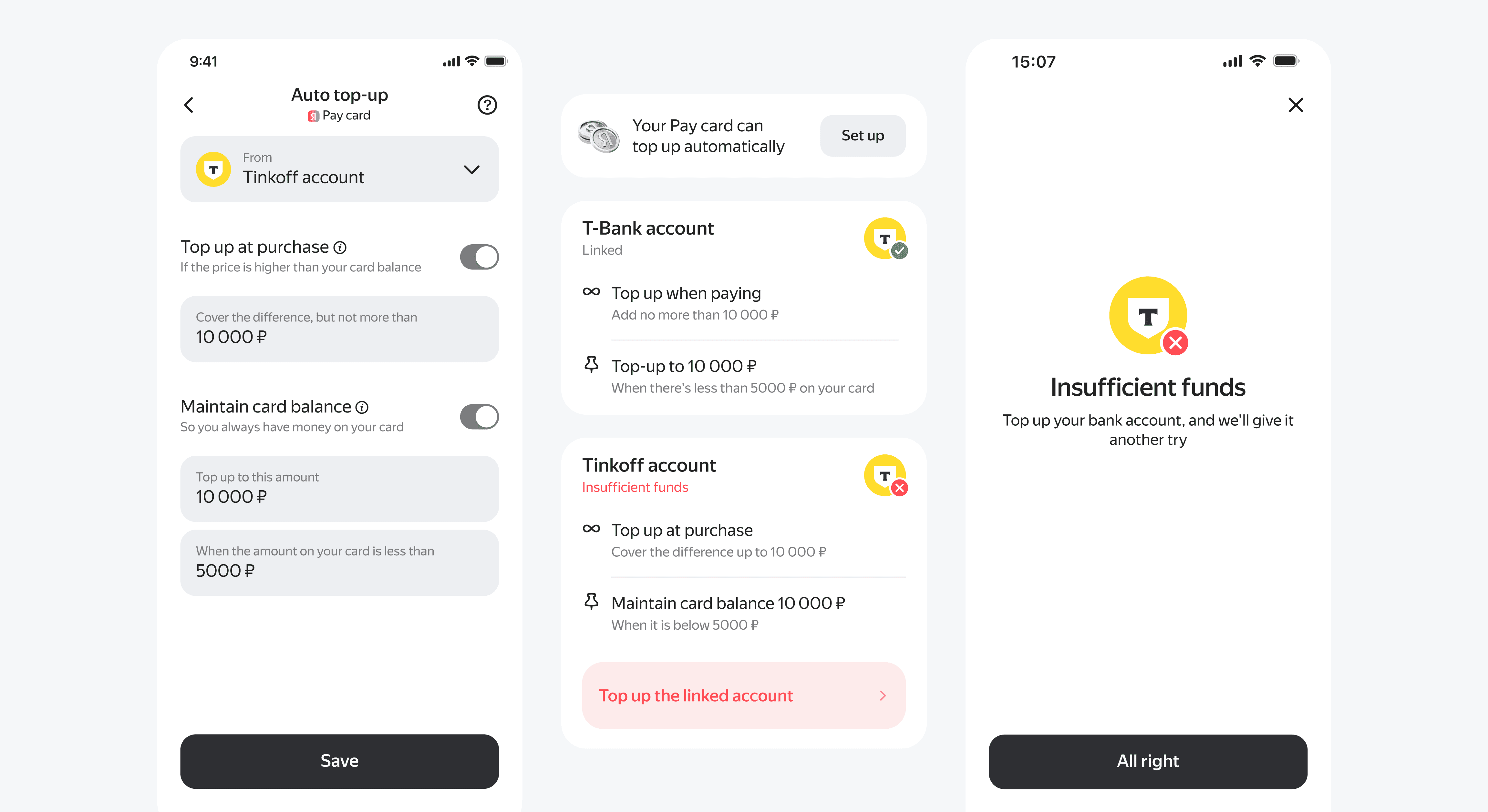
Since the feature relied on external bank requests beyond our control, many errors occurred, but users couldn’t see them or understand why it didn’t work
Solution
To address this, I introduced a widget-based setting that lets users see the current configuration and its status, helping them understand and resolve issues

Issue III. Сommunication
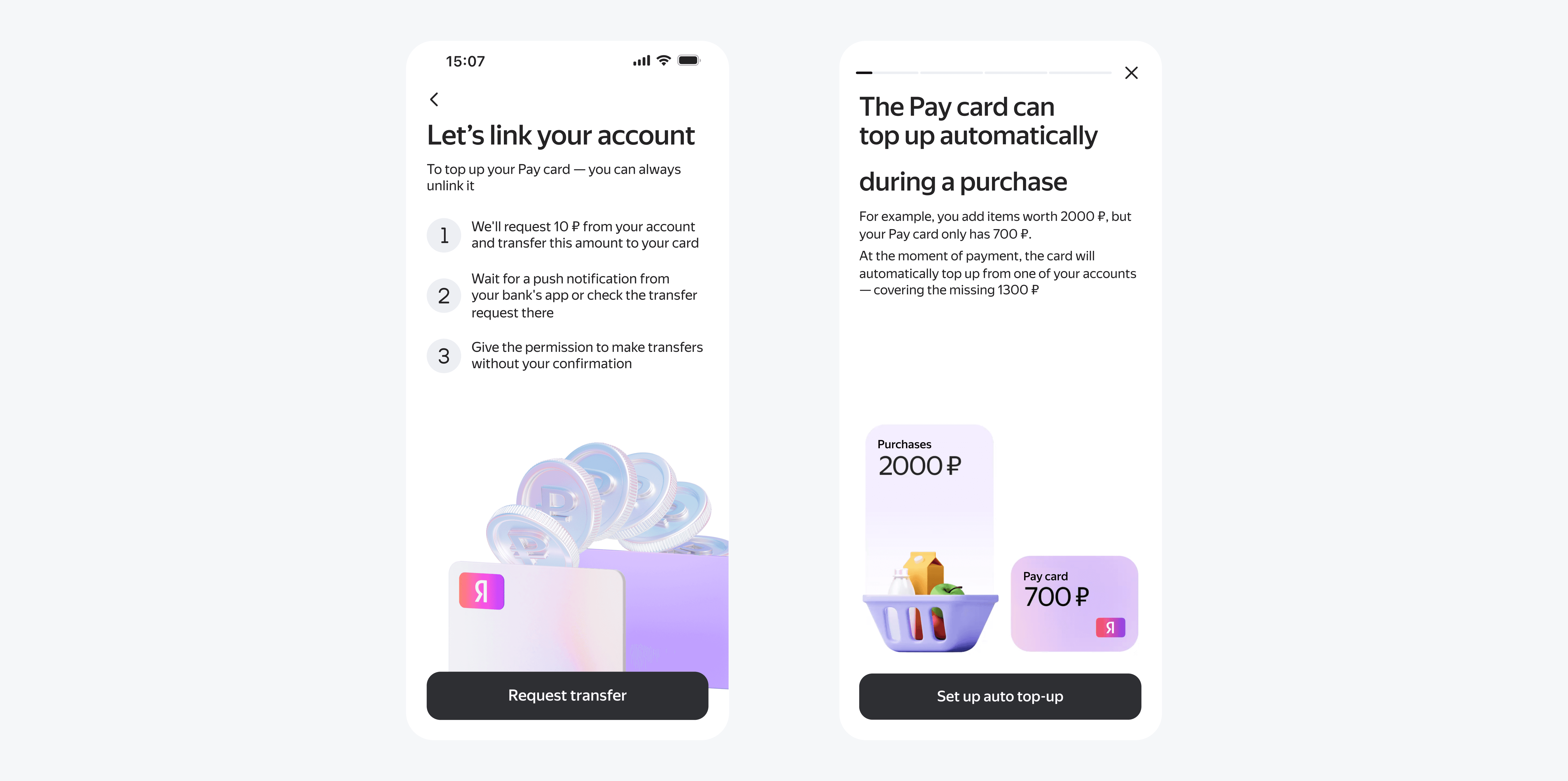
Users didn’t understand how auto top-up works and hesitated to enable it
Solution
I Improved guidance and added in-product communication to clarify the process

Step 2 — next iteration
In this version, users easily found the entry point and understood the feature, but the linking payment remained a weak point, which we improved in the next iteration
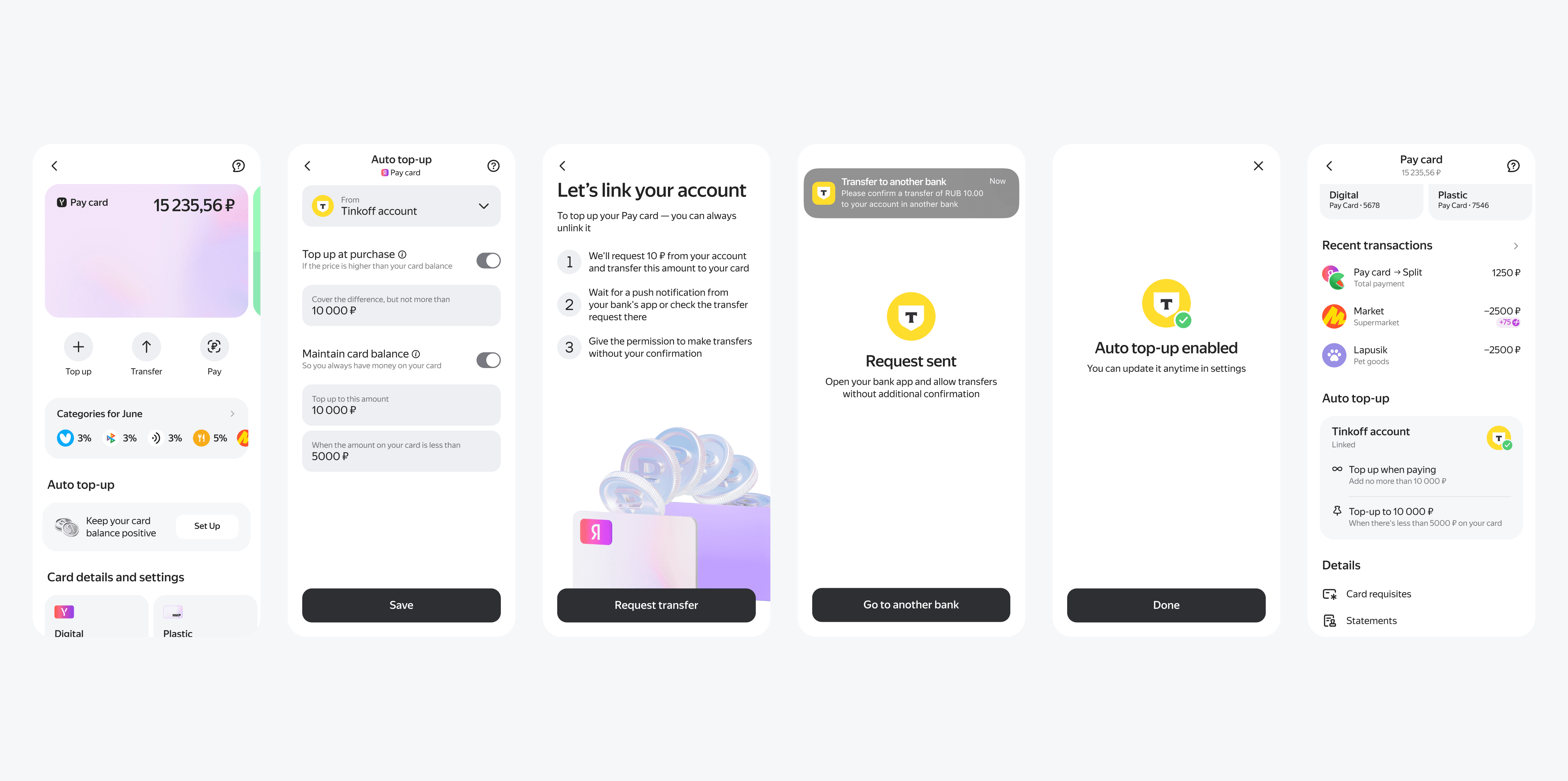
Step 3 — current version
After the first version, conversion on the linking auto top-up was low. Users had to approve the transfer in their bank app, but many couldn’t find it. In the next iteration, we made the linking payment optional, as many users had already granted permission via previous transfers. Instead of removing it, we added a recommendation screen with a quick link to check it, and introduced an optional test payment to verify setup.
Settings redesign
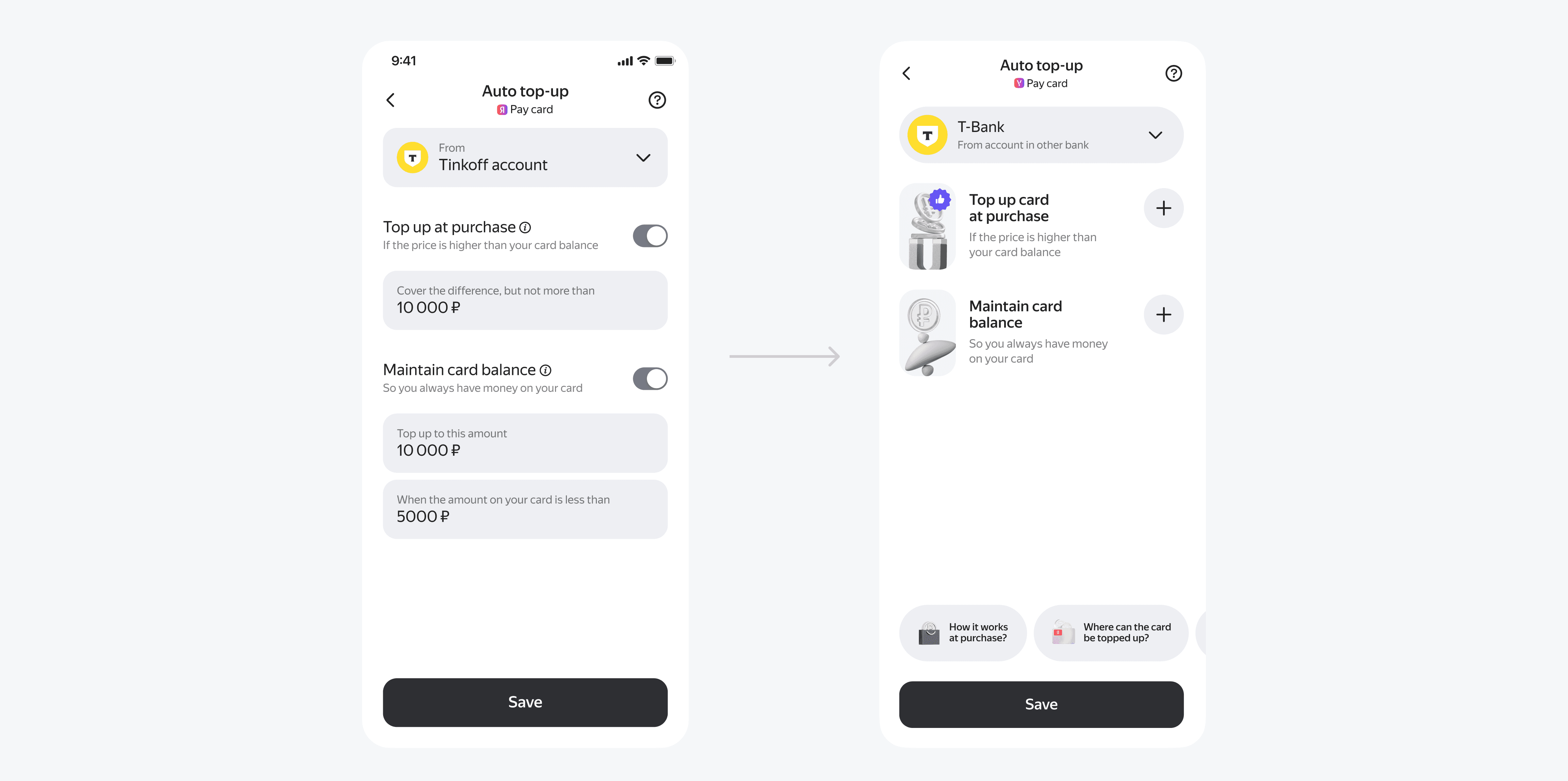
After validating that the feature worked well, we redesigned the settings. The goal was to clearly separate two flows within the same feature, as they are promoted differently
One keeps the card balance at a defined level, while the other tops up at the moment of purchase to avoid declined payments at checkout


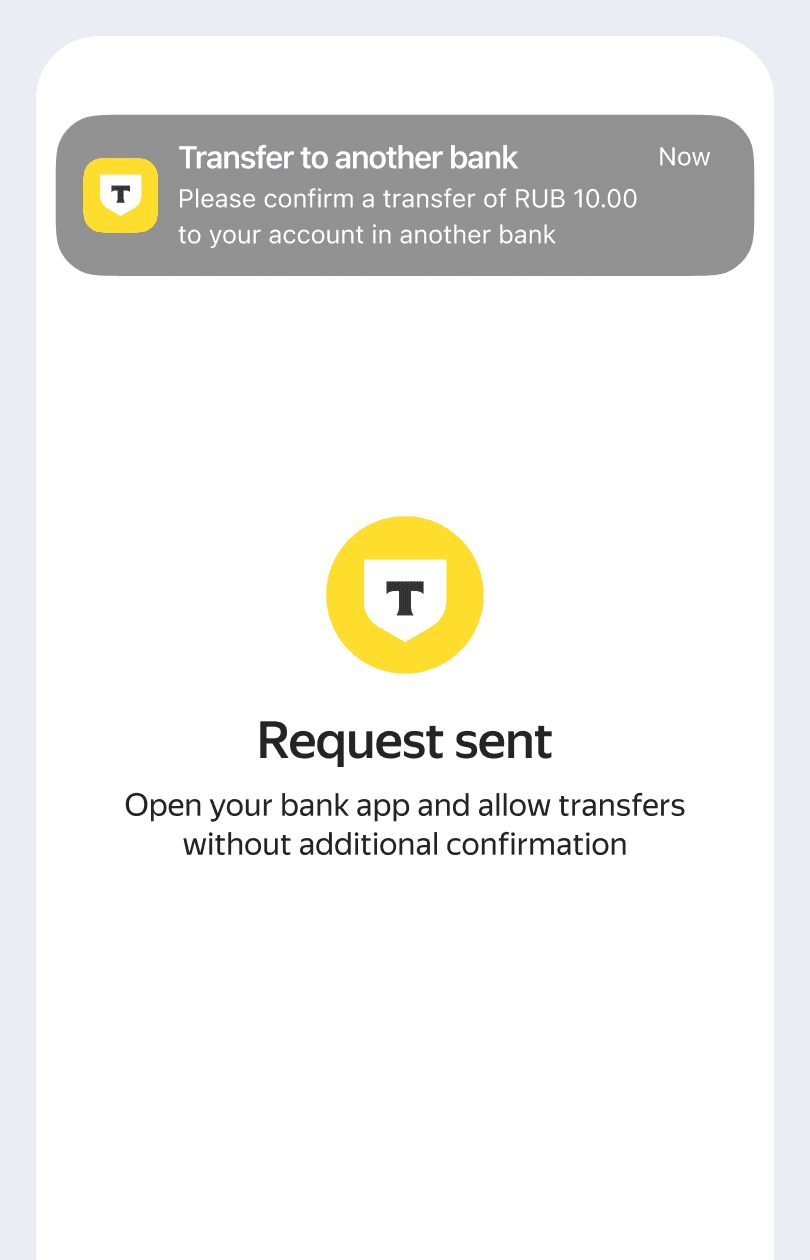


After the first version, conversion on the linking auto top-up was low. Users had to approve the transfer in their bank app, but many couldn’t find it. In the next iteration, we made the linking payment optional, as many users had already granted permission via previous transfers. Instead of removing it, we added a recommendation screen with a quick link to check it, and introduced an optional test payment to verify setup.
Step 3 —
current version
After validating that the feature worked well, we redesigned the settings. The goal was to clearly separate two flows within the same feature, as they are promoted differently
One keeps the card balance at a defined level, while the other tops up at the moment of purchase to avoid declined payments at checkout
Settings redesign


Outcomes
Auto top-up turned a failed payment from a reason to leave into a minor hiccup: up to 10× fewer users lost
200K
Users turned on auto top-up
5% of MAU, 70× up from the first version
−18 pp
Users lost after a payment error
20% → 2% with auto top-up
−7 pp
Failed transactions per user
14% → 7% with auto top-up
+10 pp
Payments completed in the same visit
86% → 96% with auto top-up
Auto top-up
I designed and launched auto top-up from scratch — a modular debit account feature that enables seamless payments by covering low-balance scenarios and maintaining a target balance, reducing payment failures
Auto top-up
I designed and launched auto top-up from scratch — a modular debit account feature that enables seamless payments by covering low-balance scenarios and maintaining a target balance, reducing payment failures
Pain point
Pay Card isn’t the primary account for most users but is valued for cashback. We needed to increase GMV and reduce low-balance payment failures
We tested two approaches: instant top-up during checkout and auto top-up to maintain a minimum balance
Step 1 — launching MVP
In the MVP, auto top-up was located in general settings, as the debit card had no dedicated section. The MVP covered core flows to validate the feature and measure results.
Issue I. Entry point
The entry point was hard to find.
Once the Pay card got its own section, we moved auto top-up settings there. I solved by moving auto top-up settings into debit account
MVP revealed III issues
In this version, users easily found the entry point and understood the feature, but the linking payment remained a weak point, which we improved in the next iteration
Step 2 — next iteration
Issue II. Errors
Since the feature relied on external bank requests beyond our control, many errors occurred, but users couldn’t see them or understand why it didn’t work.
To address this, I introduced a widget-based setting that lets users see the current configuration and its status, helping them understand and resolve issues
Issue III. Сommunication
Users didn’t understand how auto top-up works and hesitated to enable it.
I Improved guidance and added in-product communication to clarify the process
Outcomes
200K
Users turned on auto top-up
5% of MAU, 70× up from the first version
−7 pp
Failed transactions per user
14% → 7% with auto top-up
−18 pp
Users lost after a payment error
20% → 2% with auto top-up
+10 pp
Payments completed in the same visit
86% → 96% with auto top-up
Auto top-up turned a failed payment from a reason to leave into a minor hiccup: up to 10× fewer users lost
Pain point
Pay Card isn’t the primary account for most users but is valued for cashback. We needed to increase GMV and reduce low-balance payment failures
We tested two approaches: instant top-up during checkout and auto top-up to maintain a minimum balance
Step 1 — launching MVP
In the MVP, auto top-up was located in general settings, as the debit card had no dedicated section. The MVP covered core flows to validate the feature and measure results.
Settings redesign
After validating that the feature worked well, we redesigned the settings. The goal was to clearly separate two flows within the same feature, as they are promoted differently
One keeps the card balance at a defined level, while the other tops up at the moment of purchase to avoid declined payments at checkout
Outcomes
Auto top-up turned a failed payment from a reason to leave into a minor hiccup: up to 10× fewer users lost